Add CalorieCalc widgets to your Android home screen and see your daily calories, macros, water intake, and streak at a glance — without ever opening the app. Real-time updates every time you log a meal.
Try It Free
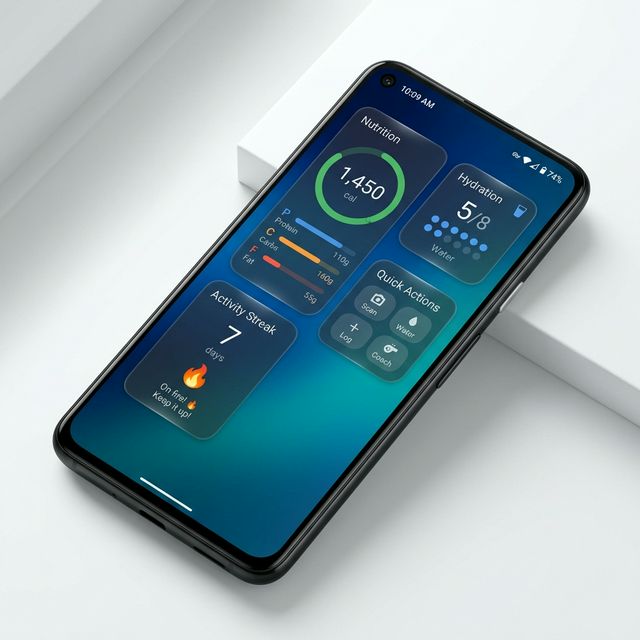
See your daily calorie progress as a visual ring with remaining calories and protein, carbs, and fat progress bars. Tap to open the app instantly.
Track your daily water intake with visual dot indicators. See how many glasses you've had at a glance and stay hydrated throughout the day.
Your current tracking streak displayed prominently with motivational messages that change as your streak grows. Stay motivated daily.
One-tap access to Scan, Water, Log, and Coach — the four most-used actions. Skip the navigation and jump straight to what you need.
Long-press on any empty space on your Android home screen until the menu appears.
Tap "Widgets" and search for "CalorieCalc". You'll see all 4 widget options.
Long-press the widget you want and drag it to your home screen. It'll start showing your data automatically.
Widgets update instantly every time you log a meal, add water, or complete a scan. No manual refresh needed.
Widget data is stored locally on your device. Your progress is always visible — even without an internet connection.
Widgets use Android's native update system. Minimal battery impact with smart update intervals.
Widgets feature a sleek semi-transparent dark background that blends beautifully with any wallpaper.
Tap any widget to jump straight into the CalorieCalc app. Quick Action buttons deep-link to specific features.
Home screen widgets are available on all plans — free, Plus, Pro, and Elite. No subscription required.
Download CalorieCalc and add widgets to see your nutrition at a glance — no app opening required.
Download Free on Google Play